Prices checked September 23, 2026. I’ll update this post when the sale starts on October 6.
Here’s something that stopped me in my tracks. I pulled up 13 gaming laptops on Amazon this week, and seven of them run the exact same graphics card. The most expensive of those seven costs about 70% more than the cheapest.
Same GPU. Wildly different price tags.
That’s the kind of thing that makes shopping for a gaming laptop feel like a minefield, especially when every listing is wearing a red discount badge. So I went through all 13 to work out which discounts hold water, which ones are smoke and mirrors, and which laptops are worth waiting on until October 6.
One thing worth saying upfront: not a single laptop on this list carries an official early Prime badge from Amazon. A few do have something better, though, and I’ll explain what to look for in a moment.
Early Prime Day 2026: What’s Actually Happening
Amazon’s fall sale, Prime Big Deal Days, runs October 6 at 12 a.m. PT through October 7 at 11:59 p.m. PT. That’s 48 hours. If you’re on the East Coast, it starts at 3 a.m. on the 6th.
Most deals are for Prime members, which costs $14.99 a month or $139 a year. New members usually get a free trial.
What you’re seeing on Amazon right now is the warm-up. Amazon typically releases early deals in the weeks before the event, and some of them are the real thing. The trouble is that gaming laptops are discounted year-round, so telling a genuine early deal from a routine markdown takes a bit of detective work.
Seven Laptops, One Graphics Card, a Huge Price Gap
This is the headline of the whole list. Seven of these 13 laptops carry the same mid-range NVIDIA GPU, and yet the priciest costs roughly 70% more than the cheapest.
Some of that gap makes sense. Bigger screens, more memory, faster processors, better cooling. But not all of it does.
Take the two closest examples. One is an 18-inch MSI with a 24-core Intel Ultra 9 chip, 32GB of memory, a 1TB drive, and a 2560×1600 display at 240Hz. The other is an 18-inch ASUS ROG with, near enough, the exact same list of specs. The ASUS costs about 39% more.
What does that extra money buy? Build quality, cooling design, and the ROG badge, mostly. Whether that’s worth nearly 40% is a question only you can answer. But you should at least know you’re being asked the question, because the listings certainly won’t tell you.
The lesson here is simple. With gaming laptops, the graphics card is the headline, not the whole story. Compare apples to apples on screen, memory, cooling, and chassis size before you decide one laptop is “expensive” and another is a bargain.
How to Read These Listings Before You Buy
A red badge and a crossed-out number tell you almost nothing on their own. Here’s what I actually check.
Look for Amazon’s low-price badges. Three laptops on my list show “30-day low price” and one shows “90-day low price.” These are based on real recent selling prices, so they’re the most trustworthy signal here. A “Limited time deal” badge, by contrast, is a routine promotion Amazon runs all year.
Be skeptical of huge list prices. One laptop on this list claims a 45% discount, by far the biggest here, and the second-biggest is 22%. Everything else sits between 5% and 13%. When one listing’s discount is double everyone else’s, that usually says more about the list price than the sale price. The devil’s in the details.
Check what “2TB storage” really means. Two listings advertise 2TB of storage, then quietly clarify it’s a 1TB internal drive plus a 1TB docking station. That’s a bundled external drive, not space inside the laptop. Handy, sure, but it’s not the same thing.
Read the VRAM, not just the GPU name. Two of these list an 8GB version of their graphics card. The same GPU also ships in higher-VRAM configurations, and at 1440p, that difference shows up in demanding games.
Ignore perfect star ratings on new listings. Five laptops here have fewer than five reviews, and three of those show a flawless 5.0. One person leaving a good review isn’t a track record. Look at the models with dozens or hundreds of ratings instead.
Check the GPU’s wattage if the listing mentions it. Two laptops with the same graphics chip can perform noticeably differently depending on how much power the manufacturer lets it draw.
What June’s Prime Day Tells Us About October
June’s Prime Day is the best crystal ball we’ve got, and it sends a mixed message.
On one hand, gaming laptops went genuinely low. Tom’s Hardware confirmed that one of the ASUS models on my list hit an all-time low during the June sale, comfortably below where it sits today. Acer’s Nitro V with the same mid-range GPU dropped to under a thousand dollars at Best Buy in an 85W configuration, and PC Gamer noted that finding that GPU tier under $1,200 was rare at the time.
So yes, October could bring real cuts, especially on the models that are barely discounted now.
On the other hand, the wind is blowing the wrong way on pricing. Gartner projects that combined DRAM and SSD prices will surge 130% by the end of the year, lifting average PC prices by 17% compared with 2025. Memory and storage are getting expensive, and gaming laptops are stuffed with both.
Translation: if you spot a price you’re happy with on October 6, I wouldn’t sit on your hands waiting for Black Friday to do better. It might not.
The Gaming Laptops I’m Tracking
Here’s the list, grouped by graphics tier. For each one you’ll get the discount on offer, what badge it carries, what I like, the catch, and whether I’d buy now or wait for October 6.
Budget Pick
There’s only one laptop here under the $1,000 mark, and it’s the oldest hardware on the list by some distance.
1. HP Victus 15.6″ (Intel Core i5-13420H, RTX 3050 6GB)
Discount: 5% off | Badge: 30-day low price
Rating: No ratings yet
The Victus line has always been HP’s sensible entry point, and the spec sheet here isn’t bad on paper: a 144Hz FHD IPS screen, 16GB of memory, a 1TB drive, HDMI, Ethernet, Wi-Fi 6, and a backlit keyboard. It’ll run most games at 1080p if you’re not chasing ultra settings.
The catch is the hardware generation. That RTX 3050 is two GPU generations behind everything else on this list, and the memory is DDR4 rather than DDR5. For a machine at this price point in late 2026, that’s a hard sell.

The 5% discount doesn’t help its case either, even with the 30-day low badge attached.
My take: Skip unless October brings a serious cut. If you’re spending close to four figures on a gaming laptop, current-generation graphics should be the baseline, not a stretch goal.
RTX 5060 Laptops
This is the tier most people should actually be shopping in. An RTX 5060 handles 1080p at high settings comfortably and does decent work at 1440p. Both of these are HP’s HyperX OMEN machines, and the difference between them is instructive.
2. HP HyperX OMEN (Ryzen 9 8940HX, 16″ 2.5K OLED 165Hz)
Discount: 6% off | Badge: 30-day low price
Rating: 5.0 stars (1 review)
The screen is the star here. A 16-inch 2.5K WQXGA OLED panel at 165Hz is a genuinely lovely thing to game on, and OLED at this price tier isn’t common. Add a Ryzen 9 8940HX, Wi-Fi 7, RGB lighting, HP’s Tempest cooling, and a bundled 1TB portable drive, and it’s a well-rounded package.

The catch is memory. This configuration ships with 16GB of DDR5, which is the bare minimum I’d want for a machine in this bracket. With memory prices climbing, upgrading later won’t be cheap.
Also worth noting: that 5.0-star rating comes from exactly one review.
My take: The OLED screen makes this tempting, but a 6% discount isn’t a Prime Day price. Wait and see what October 6 brings.
3. HP HyperX OMEN 16″ (Intel Core Ultra 7 356H, 32GB DDR5)
Discount: 6% off | Badge: 30-day low price
Rating: No ratings yet
This is the same OMEN family as above, but the trade-offs flip. You get double the memory at 32GB, which is the sweet spot for gaming and multitasking, plus an Intel Ultra 7 356H, Wi-Fi 7, and RGB lighting. The 165Hz refresh rate carries over. Here’s where you need to read carefully, though. The listing advertises 2TB of storage, which turns out to be a 1TB internal SSD plus a 1TB docking station. Useful, but not the same as 2TB inside the machine
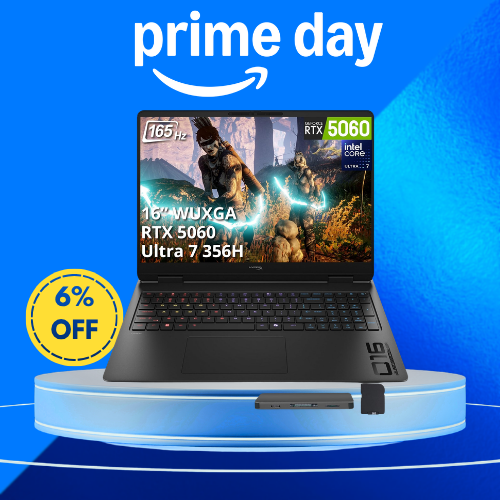
The bigger catch is the screen. You’re paying noticeably more than the OLED model above, and getting a WUXGA IPS panel instead. That’s a downgrade in visual quality for an upgrade in memory.
My take: Only worth it if 32GB matters more to you than an OLED screen. Otherwise, model #2 is the better buy
RTX 5070 Laptops: The Main Event
Seven of the 13 laptops here run this GPU, which is where things get interesting. The RTX 5070 handles 1440p properly and dips a toe into entry-level 4K, so it’s the tier to aim for if you want a machine that’ll still be relevant in three years. Just remember that the price spread across these seven is enormous.
4. ASUS V16 (Intel Core 7 240H, 16″ WUXGA 144Hz)
Discount: 5% off | Badge: None
Rating: 4.1 stars (12 reviews)
This is the cheapest RTX 5070 machine on my list, and that alone makes it worth a look. You get a 16-inch WUXGA 144Hz display, 16GB of DDR5, and a 1TB SSD in a matte black chassis. For 1440p gaming on a budget, it punches above its weight

The catch is timing, not the laptop. During June’s Prime Day, Tom’s Hardware confirmed this exact model hit an all-time low, and it was meaningfully cheaper than it is today. It’s now crept back up, with a token 5% off and no low-price badge to back it up.
Memory is also on the light side at 16GB, and the 144Hz refresh rate is the slowest of the RTX 5070 group.
My take: Wait. This model has proven it can go much lower, and October is exactly when that’s likely to happen again
5. Acer Nitro V 16S AI Copilot+ (Ryzen AI 7 350, 16″ WQXGA 180Hz)
Discount: 6% off | Badge: 90-day low price
Rating: No ratings yet
This is the only laptop on the entire list carrying a 90-day low price badge, which means it’s cheaper than it’s been at any point in the last three months. That’s the most trustworthy price signal Amazon gives you, and it counts for a lot on a page full of questionable list prices.
The specs back it up: a Ryzen AI 7 350, a 16-inch WQXGA display at 180Hz, 16GB of DDR5, a 1TB Gen 4 SSD, and Wi-Fi 6E. The sharper, faster screen is a clear step up from the ASUS above for a small step up in price.

The catch is that 16GB of memory again, plus no reviews yet on this configuration. PC Gamer also noted that Acer’s Nitro V with this GPU went considerably lower at another retailer during June, in a lower-wattage configuration.
My take: The most honestly priced laptop here. If you need a machine now, this is the one I’d be most comfortable buying before the sale
6. MSI Crosshair 18 HX AI (Intel Core Ultra 9 275HX, 18″ 240Hz)
Discount: 5% off | Badge: 30-day low price
Rating: 4.4 stars (28 reviews)
Spec for spec, this is the best value on the whole list. You get a 24-core Intel Ultra 9 275HX running up to 5.4 GHz, 32GB of memory, a 1TB NVMe drive, and an 18-inch 2560×1600 display at 240Hz. That’s a desktop-replacement machine at a mid-range price.

It also has the most reviews of any RTX 5070 laptop here, at 28, with a solid 4.4-star average and 50+ sold last month. On a page where several listings have a single review, that track record matters.
Two catches. The listing specifies an 8GB version of the GPU, which is worth knowing at 1600p. And an 18-inch laptop is a beast to carry around, so it’s better suited to a desk than a backpack.
Keep this one in mind, because it comes up again later when we get to a near-identical ASUS that costs about 39% more.
My take: The best spec-per-dollar pick here, and it carries a 30-day low badge. I’d be happy buying it now, though October could sweeten the deal.
7. Acer Predator Helios Neo 14 AI (Intel Core Ultra 9 285H, 14.5″ WQXGA 165Hz)
Discount: 5% off | Badge: None
Rating: 4.0 stars (2 reviews)
If you want serious power in something you can actually carry, this is the one. Acer has squeezed an Ultra 9 285H, 32GB of memory, a 1TB SSD, and an RTX 5070 into a 14.5-inch chassis with a WQXGA 165Hz G-SYNC matte display. G-SYNC keeps your frame rates and refresh rate in step, which makes fast games look noticeably smoother

The catch is physics. Cramming this much hardware into a small body means heat, and heat means the GPU may not sustain its full performance during long sessions. Bigger 16- and 18-inch machines breathe better.
There’s also no low-price badge here, just a token 5% off and a grand total of two reviews.My take: Wait. It’s a great concept, but you’re paying a portability premium for roughly the same price as the far more capable 18-inch MSI above
8. MSI Cyborg 15 (Intel Core 7 240H, 15.6″ FHD 144Hz)
Discount: 45% off | Badge: Limited time deal
Rating: 5.0 stars (1 review), new on Amazon in the past month
Here’s the one I’d look at twice. A 45% discount is by far the largest on this page. The next biggest is 22%, and everything else sits between 5% and 13%. When one listing’s discount is double everyone else’s, the list price usually deserves the blame.
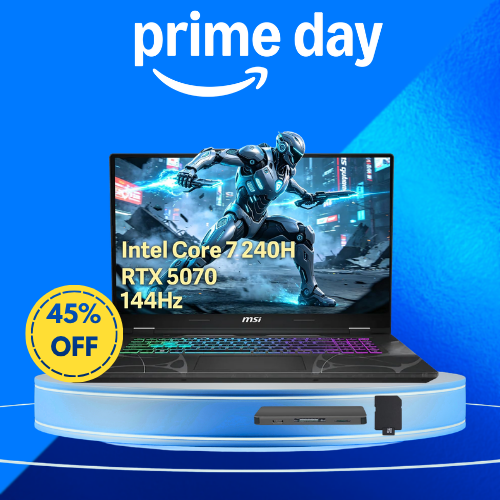
For context, the Cyborg is MSI’s entry-level gaming line, not a flagship. Yet its claimed list price here is higher than the 18-inch Crosshair’s, higher than the ROG Strix G18’s, and higher than nearly everything else on my list. That doesn’t add up.
The actual hardware is decent enough: a Core 7 240H, 32GB of DDR5, an RTX 5070 with 8GB of GDDR7, and 4-zone RGB lighting. But the screen is only FHD at 144Hz, the lowest resolution in the RTX 5070 group, and that “2TB storage” is again a 1TB SSD plus a 1TB docking station.
It’s also brand new on Amazon with a single review.
My take: Run this one through a price tracker before you even think about buying. All that glitters isn’t gold, and a 45% badge on an entry-level chassis with an FHD screen sets off alarm bells for me.
9. ASUS ROG Strix G18 (Intel Core Ultra 9 275HX, 18″ 2.5K 240Hz)
Discount: 22% off | Badge: None
Rating: 5.0 stars (4 reviews)
Now for the comparison I flagged earlier. Look at this spec sheet: a 24-core Ultra 9 275HX, RTX 5070, 32GB of DDR5, a 1TB SSD, and an 18-inch 2.5K Nebula display at 240Hz. Add Wi-Fi 7, Thunderbolt 4, Windows 11 Pro, and a bundled headphone and mouse set.
If that sounds familiar, it should. It’s essentially the same configuration as the MSI Crosshair 18 at number six, but it costs about 39% more.

So what are you paying for? The ROG name, ASUS’s build quality and cooling design, the Nebula display’s color calibration, Windows 11 Pro instead of Home, and the bundled peripherals. Those are real things. Whether they’re worth nearly 40% is a judgment call, and the listing certainly won’t frame it that way for you.
To its credit, this has the second-largest discount here at 22%, though there’s no low-price badge to confirm it’s actually near a recent low.
My take: A fine laptop that’s hard to justify next to the MSI. If ROG build quality matters to you, wait for October and hope the gap narrows.
10. HP OMEN (Ryzen 9 8940HX, 64GB DDR5, 16″ WQXGA 240Hz)
Discount: 13% off | Badge: None
Rating: 4.6 stars (20 reviews), Amazon’s Choice
This is the most expensive RTX 5070 machine on my list, and the reason is sitting right there in the spec sheet: 64GB of DDR5 memory. That’s double what any other laptop here offers.
For gaming, that’s overkill, plain and simple. Games rarely touch more than 32GB, and you’d struggle to notice the difference. Where it earns its keep is heavy multitasking, video editing, 3D work, or running virtual machines alongside your games.

The rest is solid: a Ryzen 9 8940HX, a 16-inch WQXGA IPS panel at 240Hz, a 1TB SSD, RGB lighting, and a low blue light mode. At 4.6 stars from 20 reviews, it also has one of the better track records on this page.
My take: Only worth the premium if you genuinely need 64GB for work. If you’re just gaming, the MSI Crosshair 18 gives you the same GPU and a bigger, faster screen for far less.
Two laptops here don’t fit neatly into the tiers above. One is the most powerful machine on the list by a country mile. The other isn’t really a laptop at all.
11. Lenovo Legion Pro 7 (Ryzen 9 9955HX3D, RTX 5080, 32GB, 2TB)
Discount: 10% off | Badge: None
Rating: 5.0 stars (1 review)
This is the halo product, and the price reflects it. An RTX 5080, 32GB of memory, a 2TB SSD, a 16-inch WQXGA display, and three months of PC Game Pass thrown in. The most interesting part isn’t the GPU, though. It’s the Ryzen 9 9955HX3D. That X3D chip carries AMD’s 3D V-Cache, which genuinely helps frame rates in CPU-heavy games, and it’s rare to see it in a laptop. If you’re chasing the highest possible frame rates at 1440p, this is the combination that delivers

The catches are obvious. It costs more than double most of this list, and it has exactly one review. At this kind of money, I’d want a lot more feedback before committing.
My take: Serious hardware for serious budgets. The 10% discount is respectable, but wait for October before spending this much.
12. ASUS ROG Flow Z13 (Ryzen AI MAX 390, integrated RDNA 3.5, 32GB)
Discount: 5% off | Badge: None
Rating: 4.0 stars (19 reviews), 100+ bought in the past month
The Flow Z13 is the odd one out, and I mean that as a compliment. It’s a 13-inch gaming tablet with a detachable keyboard, powered by AMD’s Ryzen AI MAX 390 with integrated RDNA 3.5 graphics. The screen is a 2.5K ROG Nebula panel at 180Hz with a 3ms response time, and you get 32GB of LPDDR5X and a 1TB SSD.

Here’s the crucial bit: there’s no discrete graphics card. The integrated RDNA 3.5 graphics are impressive for what they are, but they won’t keep pace with the RTX 5070 machines above in demanding games at high settings.
What you’re buying is portability. This thing goes where a proper gaming laptop can’t, and it doubles as a tablet.
My take: Buy it for what it is, not what you hope it’ll be. A 5% discount on a niche product means October probably won’t move the needle much.
One That Doesn’t Belong Here
13. ASUS Vivobook S16 Copilot+ (Ryzen AI 7 350, 16GB, 1TB)
Discount: 8% off | Badge: None
Rating: 4.5 stars (47 reviews), 50+ bought in the past month
I’m including this one specifically to warn you about it, because it turns up in gaming laptop searches and it isn’t a gaming laptop

There’s no discrete graphics card here. The Ryzen AI 7 350 with its XDNA neural processor is built for AI tasks and battery life, not for pushing frames in Cyberpunk. You’ll manage older or lighter games at modest settings, and that’s about the size of it.
As a regular laptop, mind you, it’s rather good. It’s a Copilot+ PC with 16GB of memory, a 1TB SSD, solid energy efficiency, and the best review count on this entire page at 47 ratings and 4.5 stars.
My take: Great everyday laptop, wrong list. If you want to play modern games, spend your money on something with an RTX 5060 or better.
What I’d Buy Now vs. Wait For
Best value today: the MSI Crosshair 18. An 18-inch 240Hz display, a 24-core Ultra 9, and 32GB of memory, all sitting at a 30-day low with 28 reviews behind it. It’s the closest thing here to a sure bet.
Safest buy right now: the Acer Nitro V 16S. It’s the only laptop on this page with a 90-day low badge, which means Amazon’s own data says it hasn’t been cheaper in three months. On a list full of dubious list prices, that’s worth its weight in gold.
Wait: the ASUS V16. It hit a confirmed all-time low during June’s Prime Day and has since climbed back up. If any laptop here is likely to drop on October 6, it’s this one.
Wait: the ROG Strix G18. Paying roughly 39% more than the MSI for near-identical specs is a tough pill to swallow. Hope October narrows that gap.
Verify before buying: the MSI Cyborg 15. That 45% badge is double the next-largest discount on this page, on a laptop from MSI’s entry-level line with an FHD screen. Check the price history first.
Skip: the HP Victus. Two GPU generations behind with DDR4 memory, and only 5% off. There are better ways to spend that money.
One caveat on all of this. Gartner projects DRAM and SSD prices will surge 130% by year-end, lifting average PC prices 17% over 2025 levels. So if you find a price you’re happy with on October 6, don’t gamble on Black Friday beating it. A bird in the hand and all that.
How to Prep for October 6
A bit of legwork now will save you from panic-buying during the sale.
Add your shortlist to your cart or wish list. When prices move on the 6th, you’ll see it straight away instead of hunting through search results.
Screenshot today’s prices. It’s the simplest way to confirm a “deal” is actually lower than what you’re seeing now.
Check the price history. Keepa and CamelCamelCamel are free, and 30 seconds with either would have told you everything you need to know about that 45% badge.
Look up the GPU wattage. Two laptops with the same graphics chip can perform quite differently depending on how much power the manufacturer allows. Manufacturers don’t always advertise it, so check reviews for the specific model.
Decide on memory before you shop. 32GB is the comfortable spot for gaming in 2026, and with memory prices climbing, upgrading later will cost you.
Set a deal alert. Amazon says Alexa for Shopping can notify you about deals on specific products or whole categories.
Check your Prime membership. Most deals are members-only, and sorting this out on the morning of the sale is a headache you don’t need.
FAQ
When does October Prime Day 2026 start?
Prime Big Deal Days runs from October 6 at 12 a.m. PT to October 7 at 11:59 p.m. PT.
Is an RTX 5070 laptop worth it in 2026?
For most people, yes. It handles 1440p gaming at high settings and has enough headroom to stay relevant for a few years. If your budget is tighter, an RTX 5060 covers 1080p ultra settings comfortably.
Will gaming laptops get cheaper on October 6?
Some will. The models with 5% or 6% discounts have the most room to move, and at least one on this list went much lower during June’s sale. But with memory and storage costs rising, don’t expect across-the-board bargains.
Why do two laptops with the same GPU cost so differently?
Screen quality and refresh rate, memory, processor, cooling design, chassis size, build quality, and brand premium. The GPU is just one line on the spec sheet.
Is 16GB of RAM enough for gaming in 2026?
It works, but it’s the floor rather than the target. 32GB gives you breathing room, and it’s harder to add later now that memory prices are climbing.
Do I need Prime for these deals?
For most of them, yes. Prime costs $14.99 a month or $139 a year, and new members can usually start with a free trial.
If there’s one thing to take from this, it’s that the graphics card on the box doesn’t tell you whether you’re getting a good deal. Seven laptops here share the same GPU, and the gap between the cheapest and priciest is roughly 70%.
My shortlist? The MSI Crosshair 18 is the best spec-per-dollar machine on this page, and the Acer Nitro V 16S is the most honestly priced thanks to its 90-day low badge. The ASUS V16 is the one I’d wait on, since it’s been considerably cheaper before. And the MSI Cyborg 15 is the one I’d check twice before trusting.
I’ll update this post with live prices when the sale starts on October 6, so check back then.